Overlapping Time Entries
This company-level Insights tool helps you find workers who logged overlapping hours across multiple projects during a pay period. It shows at the company level how many workers have time entries that overlap on the same day, along with total overlapping hours, the number of projects impacted, and the estimated duplicate labor cost based on payroll. Using this insight, payroll and operations teams can identify and correct duplicate entries before they affect job costs.
Note: The Overlapping Time Entries Insight is available with the Project Execution Enterprise package (not Resource Management).
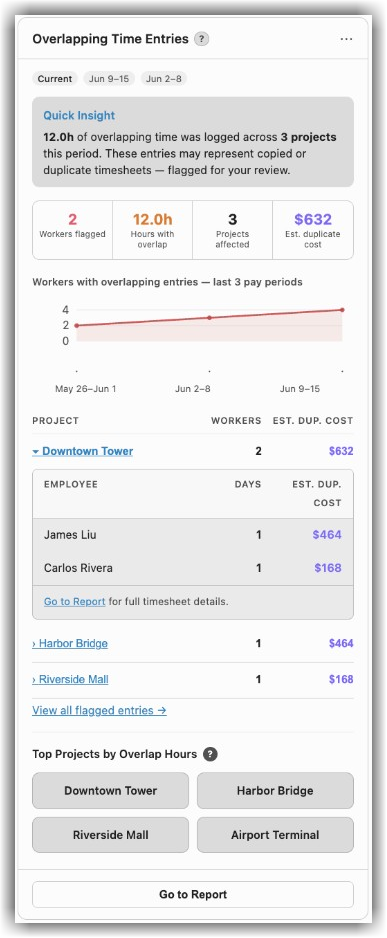
The Overlapping Time Entries Insight shows the following:
A Quick Insight summary indicating the hours of overlapping time entries logged across your projects. It also notes that these entries may represent copied or duplicate timesheets, flagged for your review.
A statistical summary displaying the number of workers flagged, total hours with overlap, projects affected, and the estimated duplicate cost.
A trend chart tracking workers with overlapping entries over the last three pay periods.
A project table showing the breakdown of the workers and estimated duplicate cost per project, and each project expands to show the affected employees. For example, this insight shows breakouts by project and by individual worker, illustrating which multiple projects they are assigned to on a specific date.
A detailed list with one row per timecard entry on a flagged day, including the worker, classification, date, project, hours, and duplicated cost. Click the View all flagged entries link to open the All Overlapping Entries screen that displays the detailed list.
A view of the top projects by overlapping hours. Click Go to Report to open the full report to review and correct entries.